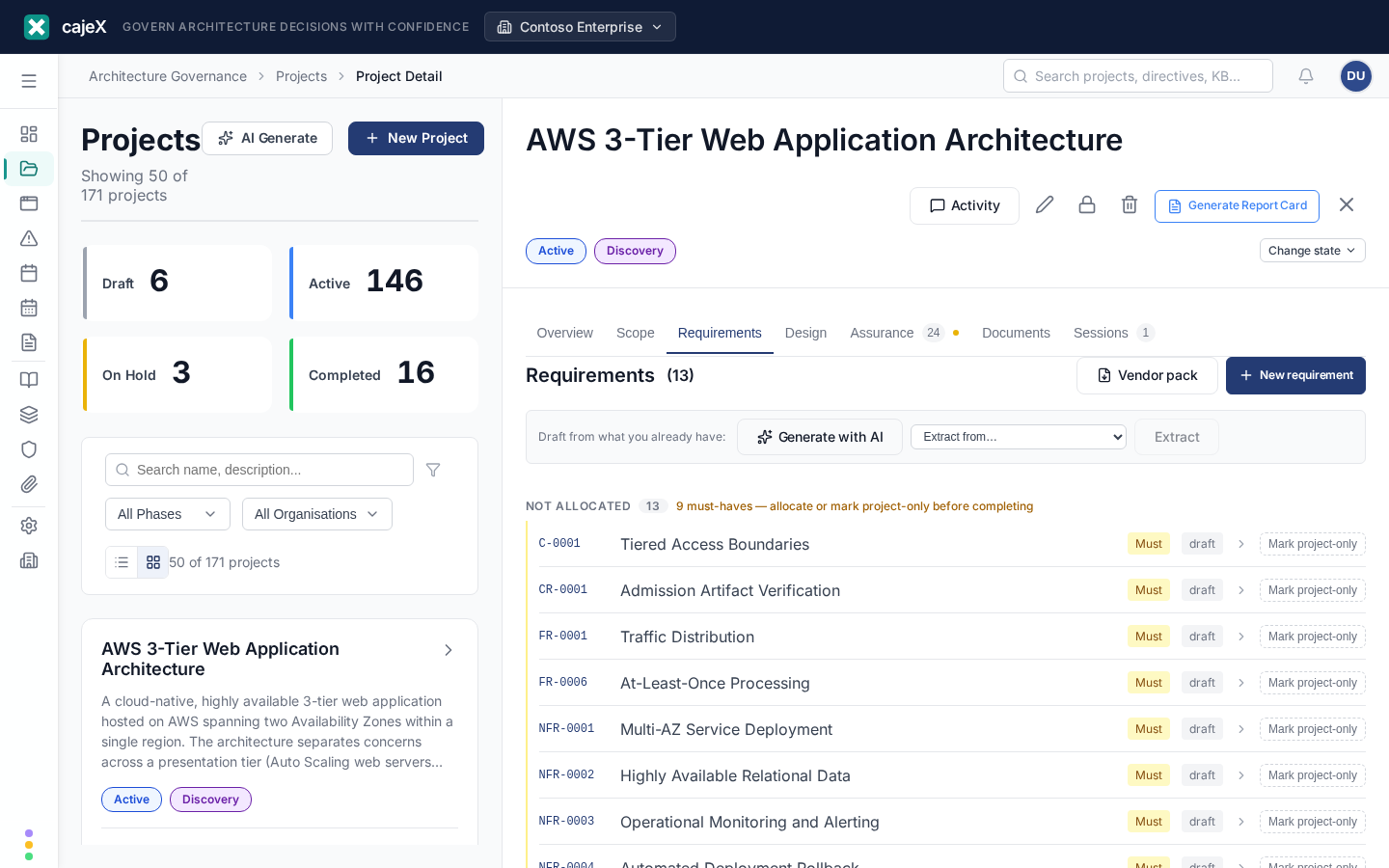
What it does
A requirement is what a solution has to do. Requirements are where a project stops being a description of work and becomes something a supplier can be held to, and something a design can be judged against.
Requirements are not directives. A directive is your standing policy — authored once, applying across every project ("customer data is encrypted at rest"). A requirement belongs to one solution and is usually negotiable with a supplier ("the platform supports 4,000 concurrent pickers in the Rotterdam warehouse"). The exception is a requirement derived from one of your directives: that provenance is exactly what makes it non-negotiable.
How to use it
Where requirements live
Requirements appear as a Requirements tab on a project and on an application. The distinction matters:
- On a project they are the needs of the change you are making.
- On an application they are its standing requirements — what must stay true, whichever project touches it next.
A requirement is owned by exactly one of the two at a time, and moves from the project to the application at handover.
References
Every requirement gets a reference like BR-0007 — a prefix for its type, then a number that is unique across your whole workspace:
| Prefix | Type |
|---|---|
| BR | Business |
| FR | Functional |
| NFR | Non-functional |
| C | Constraint |
| IF | Interface |
| DR | Data |
| CR | Compliance |
| A | Assumption |
The reference never changes — not when the requirement moves to an application, and not if you change its type. It is an identity, and by the time you might want to change it you have probably quoted it in a document you sent to a supplier.
Priority
Requirements use MoSCoW — Must, Should, Could, Won't. Only Must is emphasised in the list, because if everything looks urgent then nothing does. Must-haves are also what the project completion gate checks.
Allocation — which application a requirement is about
Early in a project you often do not know which applications will be involved, so a new requirement sits at solution level. As soon as you know, allocate it to the application it is about, using the dropdown on its row.
Allocation is what makes a large project navigable: the list groups by application, so "the WMS Core requirements" is a real set rather than a naming convention. It is also what makes handover simple later — the requirement already knows where it is going.
A requirement that genuinely spans two applications should be split: keep the parent as the statement of intent, and create a child requirement for what each application actually owes.
Anything still unallocated appears in a Not allocated group at the foot of the list. If it contains a must-have, the group says so — because an unallocated must-have will hold up completing the project, and you would rather know now than at the moment you press the button.
The lifecycle
A requirement moves draft → proposed → agreed. Propose it when it is ready to discuss; agree it when it is settled. You can defer one, or reject it with a reason.
Agreed is the point a requirement becomes something a design has to satisfy, so cajeX records who agreed it and when, the same way it does for an approved directive.
Rejected and superseded are final. If a rejected requirement comes back, create a new one — the old reference has already been quoted elsewhere, and reusing it would make two different things share a name.
Acceptance criteria
Under Overview, acceptance criteria answer "how would you know this is met?". Writing them in a Given / When / Then shape works well:
Given a picker with an open order, when they scan the last item, then the order closes on the handheld.
They are worth writing even when nobody is testing yet: they are what a verification test is generated from later, and they are the clearest thing to put in front of a supplier.
Traceability
The Traceability tab is the point of all this. It shows what a requirement derives from (the directive that forced it), what satisfies it, and what verifies it. A requirement showing a directive it derives from is one a supplier cannot negotiate away — and the tab is where you check that nothing agreed has been quietly dropped.
Generating requirements with AI
Generate with AI on a project's Requirements tab drafts a starting set. It reads the project's description, its knowledge-base entries and document names, and — the part that matters — the project's directive scope. Requirements are proposed against what this project actually has to conform to, not against your whole catalogue.
Nothing is saved. Each draft is shown with its type, priority, statement and acceptance criteria, and you accept, discard, or take the lot. Review them properly: these are statements a supplier may be held to.
Where a draft exists because of one of your directives, it carries a from <directive> chip, and accepting it records that link. That is what later lets you tell a supplier the requirement is not negotiable — so it is worth checking the chip is right before you agree.
If the model refers to a directive or application that is not in the project's scope, cajeX discards that link rather than showing you an invented one, and says how many it dropped. A generated requirement is never presented as policy-derived unless it genuinely is.
Generation is a starting point, not an answer. Expect to edit, and expect to delete some.
Extracting requirements from a document
Generation proposes requirements from a project's context. Extraction does the opposite job: it recovers the requirements already written down in a document — a business case, an RFP, a supplier's response, a workshop write-up.
Pick a document from Extract from… on the Requirements tab. cajeX reads the text it already holds for that document, so a file still being processed will say so rather than returning nothing useful.
Each extracted requirement carries a quote from the source, and cajeX checks that quote actually appears in the document before showing it. If the model paraphrased instead of quoting, the citation is removed and the requirement appears without one — never with an invented one. You are told how many were removed. A fabricated citation is a fabricated audit trail, and this is a feature people will quote in contract discussions.
Priority is taken from the document's own language: must / shall / required becomes Must, should becomes Should, may or nice to have becomes Could. Nothing is promoted to Must because it sounds important.
Asking the assistant to add one
With a project or application open, you can describe a need to the cajeX assistant in ordinary words — "they need to be able to finish an order without switching devices" — and ask it to capture that as a requirement. It proposes one, you confirm it, and it lands in the list.
The assistant proposes; it never creates. And it will not offer the action unless a project or application is open, because a requirement always belongs to exactly one of them.
Working on a requirement with the assistant
Open a requirement and the assistant can see it — its statement, its priority and status, its acceptance criteria, and which design elements satisfy it. So you can ask things it could not answer before:
- "Is this testable as written?" — it can tell you, because it can see whether there are acceptance criteria at all.
- "Draft acceptance criteria for it" — it proposes the wording; you confirm before anything is saved.
- "Which application should own this?" — it proposes one of the applications this project touches. It will not invent one, and it does not offer this at all if the project has no linked applications.
- "Propose this for review" — it can move the requirement through its lifecycle, but only along a step that is actually legal from its current status.
It can also answer questions across the whole workspace without anything open — "which must-haves are not allocated?", "which requirements have no acceptance criteria?"
Everything here is a proposal you confirm. If you cannot edit a requirement yourself, the assistant will not offer to edit it for you.
Handover — what happens when the project completes
When you complete a project, cajeX hands its requirements over to the applications they were allocated to. Each one moves: same reference, same status, same links to the directive it derives from. It is not copied, so there is only ever one of it and its history stays in one place. The application it lands on records which project it came from.
Unlike the documents half of handover, this needs no AI suggestion. A document does not know whether it describes the change or the application, so cajeX has to read it and guess. A requirement already knows — it has been carrying its target application, often for months.
One thing will stop you completing: a Must requirement that is neither allocated to an application nor marked project-only. It has nowhere to go, and completing the project would simply lose it. Two ways forward, both on the Requirements tab:
- Allocate it to the application it is about, so it carries over.
- Mark it project-only if it was about the change itself. "Cut over within a single weekend window" is a real must-have that no application inherits, and saying so is a decision rather than an oversight.
Should, Could and Won't requirements never block; they are listed at handover and stay with the project unless you allocated them.
The Requirements tab warns you about this as soon as it applies, so it is not a surprise at the moment you press Complete.
Availability
Requirements are off by default. A workspace owner or admin turns them on in Settings → Features.