What it does
A requirement says what the solution must do. A test is how you prove it did.
Without tests, a requirement set is a wish list: everyone agrees the words are right and nobody can say whether they came true. cajeX keeps the two joined — a test names the requirement it verifies, so a passing test is evidence about something specific rather than a green tick with no subject.
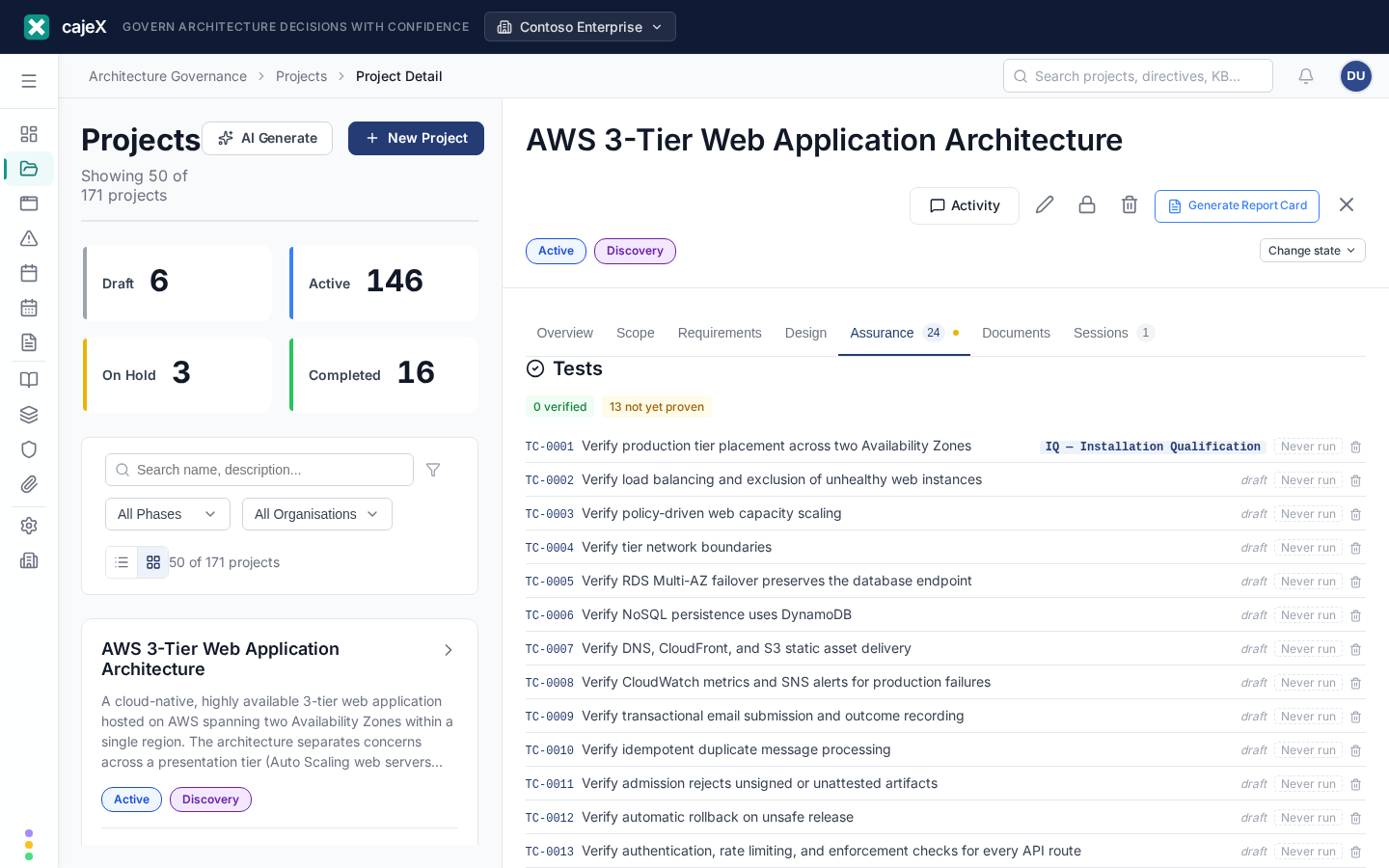
Tests live on the Assurance tab of a project or an application, alongside findings.
How to use it
Writing a test
New test creates one by hand. Draft with AI writes one per requirement, from that requirement's acceptance criteria — which is why acceptance criteria are worth writing properly: a requirement with none produces a test that proves nothing.
Every test carries:
- Objective — what it is trying to establish, in a sentence.
- Method — how the proof is obtained: test (executed), demonstration (shown working), inspection (read or examined), analysis (reasoned or calculated). Not everything can be executed, and saying so honestly is better than calling a document review a test.
- Steps — numbered, executable actions. What to do, with what data, in what state. Not a description of the feature.
- Expected result — something observable. "Works correctly" is not a result; "the order appears in the queue with status PENDING" is.
Draft and ready
A test starts as a draft. Drafts are yours to work on and are deliberately left out of anything you send a supplier — a test nobody has read proves nothing, and shipping one invites a supplier to answer a question you did not mean to ask.
Mark ready when it is fit to be handed over. That is the only thing separating a working note from a contractual expectation.
Recording a run
Pick an outcome, add a note, and Record. A failing result needs a note — a failure without a reason is not a finding, it is a rumour.
Results accumulate, so a test has a history rather than a current state. You can label a run with a cycle — "Round 2", "Post-fix" — when you re-run a set of tests together and want the rounds to read separately.
A failed result raises a finding. That is the point of the join: verification failure becomes governance work rather than a note in a spreadsheet.
What "verified" means
Each requirement's verification state is worked out from the latest result of every test linked to it, and it is never stored — a stored copy would drift the moment you recorded a result.
| State | Meaning |
|---|---|
| Verified | Every linked test has actually passed. |
| Failing | At least one linked test's latest run failed. |
| Not yet proven | Tests are linked, but not all of them have passed. |
| No test | Nothing is linked yet. |
Not yet proven is deliberately kept apart from Verified. A requirement with three tests where one passed and two were never run is not verified — calling it so is how a gap reaches production wearing a green tick. Blocked and skipped prove nothing and count the same as never-run; why they were blocked belongs in the note.
Must-haves with no test at all are called out separately, by reference. A failure is something you know about; an untested must-have is something nobody has thought about yet, and it is invisible unless it is named.
Raising a finding from a failure
A failed or blocked result offers Raise finding. The finding is pre-filled with the test, what it verifies, what happened and what was expected, and its id is written back to the result so the trail runs both ways. A result can only raise one finding — asking twice tells you it already did.
Results are events, not edits. Re-running a test appends a new result rather than replacing the last one, so the history of what failed and when stays intact — that trail is the thing somebody needs when they ask "how long was this broken?"
The three verification stages
When you hand a protocol to a supplier, tests are grouped into three stages. They always ask the same three questions:
- Is it installed and configured as designed?
- Does it operate as specified under normal conditions?
- Does it perform under production-like conditions?
What those stages are called is your workspace's choice, because the words differ sharply by industry and the supplier reading the document has to recognise them. Set it under Admin → Terminology → Verification stages, where all four are shown side by side with the words each one produces — so you can pick by reading what a supplier will actually see:
| Vocabulary | Stages |
|---|---|
| Plain English (default) | Installed correctly · Works as specified · Performs under load |
| Regulated (GxP) | IQ · OQ · PQ — Installation, Operational and Performance Qualification |
| Enterprise IT | Deployment verification · System integration test (SIT) · Performance and resilience test |
| Industrial / plant | SAT — Site Acceptance · Commissioning · Performance run |
Changing it is safe at any time. Only the words change — every existing test keeps the stage it was in.
Factory Acceptance Testing (FAT) is deliberately not one of the three. FAT happens at the supplier's site before delivery, so it sits before this sequence rather than inside it.
Putting a test in a stage
Open a test and choose one under In a supplier pack. A test with no stage is still included — it appears under Other verification — it simply is not one of the three. That is a perfectly normal state for a test that checks something outside the install/operate/perform sequence.
The two packs
Protocol pack is the tests you already have, ready ones only, grouped by stage, as a PDF to send a supplier. Each test prints with a Result / Date / By line so it can be executed on paper and signed.
Protocols is different: it generates protocol steps from scratch, against the selected design and the requirements it must satisfy. Use it once a candidate has been chosen and you need a verification plan to hand over.
Neither pack carries your internal assessment verdicts, your notes about other candidates, or anything about suppliers you did not choose.
Permissions
Anyone who can read the project can read its tests and results. Creating, editing, marking ready, and recording results need edit rights on the project or application. Changing the verification stage names is a workspace admin or owner setting.
Tips
- Write acceptance criteria before generating tests. The generator works from them. A requirement with none produces a test that restates the requirement in the future tense, which proves nothing and wastes the tester's afternoon.
- Be honest about method. Marking an inspection as a test makes a verification plan look stronger than it is, and the person who has to execute it will discover the difference.
- A test with no linked requirement is a warning, not an error. cajeX says so on the test rather than blocking it — sometimes you genuinely want a check that stands alone — but if most of your tests are unlinked, the traceability the pack is supposed to demonstrate is not there.
- Mark ready late rather than early. It is the line between a draft and something a supplier will be held to.