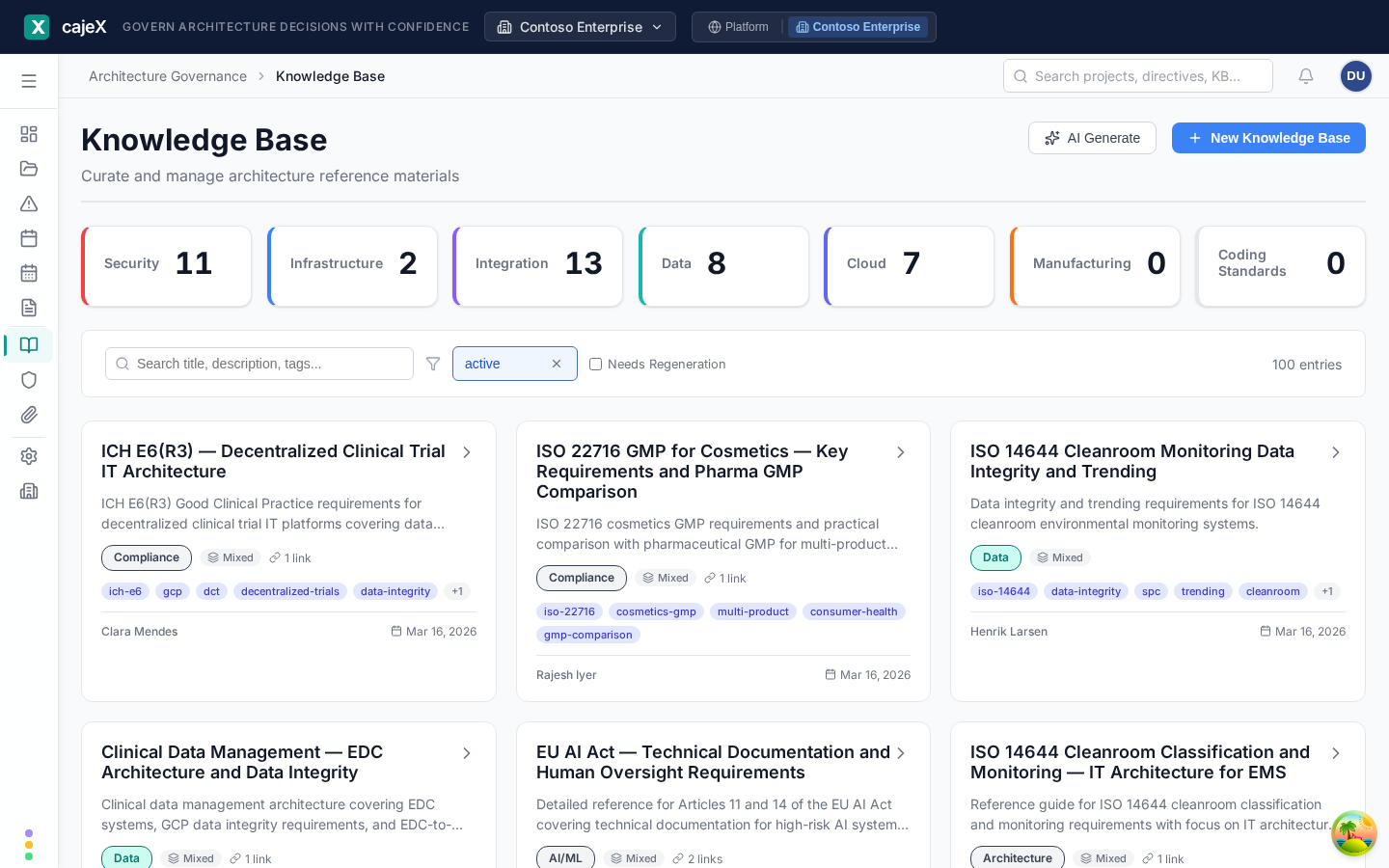
What it does
The Knowledge Base (KB) is where your raw architectural material lives: standards, policies, whitepapers, reference architectures, internal best-practice notes. Put in anything an architect would consider authoritative for your organisation.
The KB is the upstream of your own directives. The AI Co-Worker reads KB entries to draft candidate directives, and an AI review can draw on them as context. Frameworks from the catalogue bring their directives with them; the KB is for what is specific to you.
How to use it
Finding your way around
The tiles across the top count entries by category (Architecture, Security, Data, Compliance and so on), the same categories directives use. Click a tile to see only that category. Below them are a search box, a filter, a Needs Regeneration checkbox, and a switch between rows and cards. The list starts on active entries; clear that chip to see archived ones too.
Adding an entry by hand
- Click New Knowledge Base.
- Give it a Title, a Description, and a Category.
- Add Tags, separated by commas, and any Links to sources.
- Write or paste the content into Body. It is Markdown, up to 50,000 characters.
- Attach files if you need to: PDF, Word, Excel, PowerPoint, images or Visio, up to 100 MB each.
- Create Entry.
Generating an entry with AI
AI Generate writes a structured entry from material you give it. It works in four steps: Source Material, Generating, Preview, Save.
- Add your sources: URLs, files, or free text. Up to ten inputs.
- Add Additional Instructions if you want the entry shaped a particular way.
- Generate. It runs in the background; you can close the dialog and carry on, and you are told when it finishes.
- Read the Preview, edit it, and Save. Nothing is saved until you do.
Long documents are read in full, not sampled. Where a source was too large for one pass, the entry says so.
Opening an entry
Click an entry to open it beside the list. You see its description, its information (who created and updated it, and when), tags, links, attachments and content, and a comment thread.
- Edit changes the entry. Earlier versions are kept in its version history.
- Regenerate rebuilds a generated entry from its original sources, for when a source has changed or the first result was not good enough. An entry flagged Needs Regeneration is one whose source is known to have changed.
- Archive takes an entry out of use without deleting it. Restore brings it back.
From knowledge base to directives
Directives are generated from the Directives screen, not from here: Directives → AI Generate asks which KB entries to use as sources. See Directives.
Removing a KB entry does not remove directives that were drafted from it. Once approved, a directive stands on its own.
Permissions
Everyone in the workspace can read the knowledge base. What you can create, edit, archive or generate depends on your role in the workspace; actions you may not take are not shown to you.
Tips
- Keep one entry per coherent topic, for example "API authentication standard". Long documents that cover everything produce muddier directives.
- When a standard is reissued, edit or regenerate the existing entry instead of creating a second one. Its history stays intact and so does the link to the directives drafted from it.
- Choose the category with care. Directives and the knowledge base share one set of categories, and a review scoped to a category uses it.
- The assistant can explain an entry, answer questions from it, and propose a rewrite for you to accept. Open an entry and use Ask cajeX.